Каждый день мы раздаем лицензионные программы БЕСПЛАТНО!
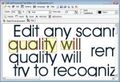
Giveaway of the day — Scanned Text Editor 1.0
Scanned Text Editor 1.0 был доступен бесплатно 11 сентября 2010 г.

Редактируйте любые отсканированные документы, при этом ничего не теряя. Расположение элементов и качество самого документа останутся как в оригинале. Программа НЕ БУДЕТ распознавать текст, а просто заполнит пробелы символами и картинками из фона, и эти объекты вы сможете просто передвигать как вам нужно.
Вы сможете открывать как существующие документы (формат bitmap) или сканировать новые документы. Затем вы сможете передвигать, копировать, вставлять и удалять текст и картинки или добавлять новые объекты. Вы сможете сохранить результат в формате bitmap или распечатать его. Вы также сможете сохранить результат в формате SCA. В этом случае все объекты будут сохранены на своем уровне и не будут перемешиваться с фоном.
Системные требования:
Windows 95/ 98/ ME/ NT 4.x/ 2000/ XP/ 2003/ Vista/ 7
Разработчик:
CAD-KAS Kassler Computersoftware GbRОфициальный сайт:
http://www.cadkas.com/downengtools11.phpРазмер файла:
1.72 MB
Цена:
$79
CAD-KAS Kassler Computersoftware GbR также предлагает
С легкостью редактируйте PDF файлы! Вы сможете добавлять тексты в любом шрифте или изменять текст, чтоб исправить грамматические ошибки или изменить старые телефонные номера. Просто кликните два раза на объект текста чтобы выделить его. Вы можете выделить и перетащить любой объект в pdf файл. Чтобы отредактировать картинку, просто кликните на нее два раза и программа откроет картинку в удобном редакторе. Выбирайте, передвигайте и копируйте текст, картинки и векторную графику с помощью указателя мыши.
GIVEAWAY download basket


Комментарии
Понравилась программа? Оставьте комментарий!

WARNING!
Web of Trust reports the site may be engaged in distribution of malware!
Some poking around reveals that the images on the site claiming to be awards may be fake. None of them link back to their respective sites, and I've never heard of some of them!

http://my.jetscreenshot.com/demo/20100911-pvkm-187kb
This is the first image.It was scaned at my HP printing.You see that is a superposition.
Next i use this soft and i select scaner>Scan>Edit documents>Hide background(here are some setting to do(I not make this setting and result was not so good,it must to try until will be good).Here is result:
http://my.jetscreenshot.com/demo/20100911-6oqc-138kb
another trial was to put a text(i write Penseta)on this image.Ater you enter in :Edit Documents you go to:Add text>write your text>next click on enter(is Return) and result is here:
http://my.jetscreenshot.com/demo/20100911-zdq7-129kb
Loock at up-right corner,is write:Penseta.
Images was scaned in another position and also editing(writing text).After that i rotate images and capture with Jet Schreenshot.
Soo ,my conclusion is that is good but you must to have patience to make more trial until the result will be good.I didnt try,make research if is function to preview your setting.It will be good to be in real time,to not make more trials.Thank.
wdh,,,The software company is located in Germany, their native language is German not English. Under the circumstances I think their English is very good. How well do you speak or write German? If everyone spoke and wrote English as well as you would like, there probably wouldn't be any need for a text editor. By the way I believe you mean won't not "wont" and since, unlike the software writers, your native language is English you really need considering improving your own spelling before you knock some one else's.
Scanned Text Editor is a small [10 files, ~3.5MB], portable app for working with image files. In a nutshell it lets you independently move around any shapes or objects that it can separate from the background. Today's GOTD comes packaged in a WinRAR self-extracting file that adds Start Menu shortcuts plus an un-install file to the Windows folder.
You optionally adjust the threshold values & it selects everything that isn't white, turning any groups of continuous, colored pixels into movable objects that you can also delete. You can then save the images that way in it's proprietary format, or merge all of the individual objects with the background & either print or export a regular image file. You select the objects you want to move, delete etc by clicking on them, & you can select multiple objects by shift + clicking them or by drawing a rectangle around all the objects you want to select. You can also add new text or paste a separate image file -- when you click the button to "Add Picture" the cursor turns into cross-hairs that you click + drag to set the dimensions or area you want the image to fill -> when you've set the area click again & the image open dialog pops up to import your image file... Scanned Text Editor sizes & pastes the image accordingly, keeping the original aspect ratio [i.e. it won't stretch the image to fill all the available area]. You can import most common image file formats [plus a few uncommon ones], or use a scanner, either via Twain or WIA [i.e. the 2 main ways that you access/communicate with scanner drivers in Windows]. You can have more than one instance of Scanned Text Editor running, but I couldn't get it to copy paste between them.
That all said I'm not sure what you'd want to use Scanned Text Editor for... It might come in handy if you were forwarding a fax or something like that I imagine, but that's about it since you'll either leave traces of gray on the background or, if you set the threshold high enough to eliminate that, it will probably look like a lower quality copy... scanned text just isn't perfectly sharp, but rather feathered around the edges, & when you get rid of that feathering [i.e. set the threshold high enough], it starts to look aliased &/or blocky.
@ #13
#5 provided information that fans of giveawayoftheday like to know.
I will download this despite that alert but I very much appreciate it.
Fake awards and malware distribution accusations are important information that we should know and consider.
Web of Trust's rating are based on the ratings of general users so we take it with a grain of salt but it's helpful info and I appreciate anyone who points out fake awards or WOT info.
This site is awesome and so are the reviewers. Even if the are computer beginners, misspell words or report site reputations, they are valued and make this site great!
iPhone предложения дня »




Android предложения дня »





Скачал, установил, попробовал.
Долго и много всего нажимал, но так и не понял - ЧЕМ он отличается от обычного "Paint" (который есть в любом виндусе)?
Стирать участки, копировать рисунки, переставлять выделенные объекты вполне доступно и там.
Так разницы и не нашел. Стер и не жалею.
Save | Cancel
Программа может и хороша, но нет у меня файлов с расширением *sca, да и "формат bitmap" она не видит.
Вот если б она работала с *jpeg или *tif, цены б ей не было.
А как пишет Rem, для "удаления с картинки ненужного" есть море программ, в том числе и бесплатных, кстати и платные на этом сайте уже были.
Save | Cancel
Постоянно выдает сообщения, что ему недостаточно памяти для обработки, хотя еще ничего не делал (у меня их 3 ГБт).
Save | Cancel
Дано не видел занятных прог )))
Удалил с картинки все мне не нужное, здорово !!!!
Save | Cancel