Каждый день мы раздаем лицензионные программы БЕСПЛАТНО!

Giveaway of the day — Bandicam
Bandicam был доступен бесплатно 10 мая 2011 г.
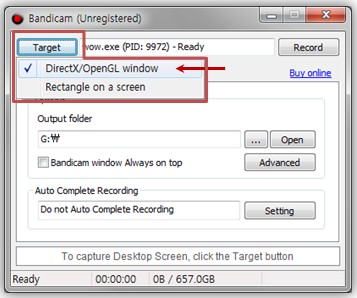
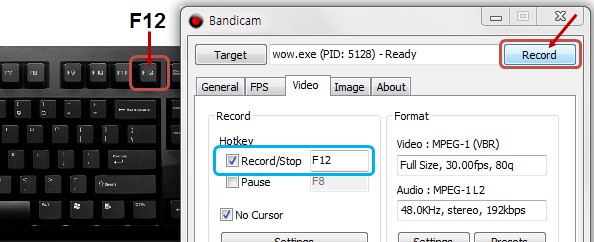
Bandicam это высококачественная программа для записи игр, видео и активности на рабочем столе. Программа записывает аудио и видео в высоком качестве, не затрачивает много системных ресурсов и делает меньше ошибок в работе. Теперь вы сможете записывать WOW, Minecraft, iTunes, YouTube, PowerPoint, Webcam, Skype, видео вызовы, потоковое видео и многое другое без зависаний и ошибок.
Bandicam записывает видео в разрешении до 2560×1600 в высоком качестве (1080p полное HD видео), а затем вы сможете выкладывать записанное видео на YouTube без предварительной конвертации, так как размер получившегося видео значительно меньше, чем видео похожих программ (1/20). Так как Bandicam поддерживает AVI 2.0, максимальный размер файла не ограничен, пока у вас есть свободное место на диске (более 7 дней записи).
Системные требования:
Windows XP/ Vista/ 7
Разработчик:
Bandisoft.comОфициальный сайт:
http://www.bandicam.com/Размер файла:
5.74 MB
Цена:
$39
GIVEAWAY download basket




Комментарии
Понравилась программа? Оставьте комментарий!

Installed and activated on Win7 Pro 32bit.
Note there is no serial number in the readme - Bandicam has been pre-registered.
IMPORTANT: You must run Setup.exe as Administrator (or an account with Administrator privileges) - otherwise the registration/activation details will not 'stick'.
The about box when registered - http://i.imgur.com/8IGGg.jpg
I suggest clicking on "Update Check" and turning off the automatic update check - so a newer version isn't installed and thus invalidating the giveaway.

I've tried a number of screen recorders on Win7x64, 1920x1200 display. They all have problems. Fraps is junk. ZD Soft Screen Recorder is professionally coded, but failed to record DirectX video on my PC. Bandicam does a fair job of recording on my PC, but there are issues with the UI and codecs. Bandicam has a far better install than Fraps, but not as good as ZD Soft. They all will use 64-bit codecs on 64-bit systems. Bandicam requires its own codecs for playback. I didn't evaluate how much damage it does to your existing codec file merits, but may not be too bad since it uses MPEG-1, which nothing else important uses. The Bandicam UI has some options, but window selection is poor (no easy selection, no desktop fullscreen mode), and no delayed recording, which means I generally can't use it to record screensavers. Bandicam's framerate was better than most on my desktop (maybe 30 fps), very low on a DirectX test on my PC. Image quality was only fair (a little blurry). On my PC, my preferred screen recorder remains the free version of Microsoft Expression Encoder 4 SP1. It records everything, good UI, fair framerate (probably lower than Bandicam on the desktop, higher on DirectX). Expression Encoder screen recording is a 2-step process, it records to an intermediate format which you then convert to a standard file format (WMV in the free version). Since you can control the quality, it can be higher than Bandicam. Expression Encoder has a learning curve, which the others don't (but Expression Encoder is designed for far more than screen recording). Which video screen recording utility works best for you will be highly dependent on your hardware and software enviroment and what recording options you need, so there is no one best answer for everyone.
@ #11 (Fubar)
For fullscreen recording click the fullscreen box in the upper left corner when in 'rectangle' mode. Also, you can set the video quality/codec in the video settings section, you can use: MPEG-1, Motion JPEG, Xvid, YV12 or RGB24
Download and installation was a breeze.
Played around with it and uploaded to Youtube without a hitch. Simple and unfussy layout. Easy to learn and looks pretty cool.
For a full review (Save my typing) go Here.
http://www.softpedia.com/reviews/windows/Bandicam-Review-194089.shtml
That sums this offering up nicely. (It is also listed on Wikpedia?)
Thanks for this freebie Bandisoft and to GAOTD.
#3: "... i have fraps but will this do the job without having laggs"
Try it & see. FWIW there is a post in their forums saying Bandicam lags more than Fraps, but there are so many system [PC/laptop] variables effecting video screen capture that mileage can & often will vary.
* * *
#7: "Much better than Ashampoo Snap 3!"
Version 3 is limited, but Snap 4 [which in e-mail offers has been as low as $4-5] allows pretty much any VFW codec, which is a big Plus. In the Bandicam forum for example they say you can't use X264 for recording -- using one of the free X264 VFW codecs, with Snap 4 you can record to H.264/AVC. That means smaller files written to disk, so you might not need to re-encode, & you might get better performance if writing to your hard drive(s) isn't extremely fast. You can also use something like the PicVideo mjpeg or huffyuv or DV codecs which are usually faster than many alternatives like Xvid.
* * *
#12: "... Free alternatives i can think of are camstudio and Wegame. The only thing i do not completely understand is why these kind of programs are relatively expensive."
There are the Microsoft apps/encoders, there's the free UScreenCapture software [after install you choose the UScreen Capture device in your capture app as if it was a TV tuner], there's the free VirtualDub [screen capture is 1 of the device options in capture mode], & you can sometimes find screen capture capabilities as part of theater &/or video streaming apps, many of which are free.
As far as expense goes, sometimes like with the Camtasia products there's been an awful lot of work put into developing it. With some you might also have codec licensing fees. A guess, some sellers might feel that many hard core gamers are more than willing to part with a lot of cash when it comes to gaming [when/if you run 2 or more $500 video cards, spend $500+ on power supplies etc., you'd be more willing to spend more $ to prove to your friends it was worth it]. The same sort of logic might apply to screen capturing video -- If you're saving yourself the $ it would cost to buy the season DVD/Blu-Ray set for whatever TV series, you can spend some of that money you saved.
* * *
#18: "Will this record Webinars?"
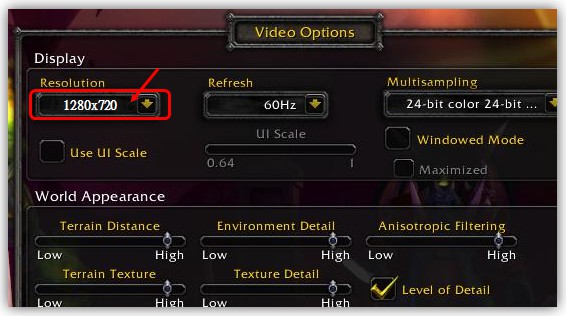
Most any video screen capture app can/will record everything that's being displayed on-screen or in a window, & if your hardware supports it, record any audio headed for the speaker or headphone out jack. Note however that your web browser can use a significant amount of your PC's/laptop's resources, especially when using Flash, cutting into what's available [left over] for screen capture. You might have to reduce your screen resolution -- as suggested in a couple of the Bandicam forum posts & on their site -- or you might find it easier to record everything on an external box, like a DVD Recorder. You can sometimes find those recorders very cheap nowadays, & if your graphics hardware doesn't have a TV out, places like meritline.com often have cheap [~$20 or less] hardware for that too.
* * *
#19: "Paint Shop froze up within seconds "
My guess would be a conflict using DirectX... Bandicam has 2 modes, DX/OpenGL or regular screen capture, you might be able to turn off DX in your graphics app, you might be able to fix it upgrading your graphics card drivers [after a backup of course ;-) ], you might be able to get things working trying different driver settings for DX &/or OpenGL for your graphics hardware. A stretch, XP can use several different Direct Show Video Renderers, & you could try changing the one your Windows is using, &/or try the latest .NET if you haven't already [it includes a version of 7's EVR], &/or try tying up some of the video rendering/display components by opening a video in Windows Media Player, stopping it, & then just ignoring it. [Many apps, not just video or graphics use Direct Show &/or Direct 3D for display, & graphics/video apps might also use one or both of those to do part of the work internally as well.]
iPhone предложения дня »





Android предложения дня »




to Елена & Echinosor: Нормальный перевод был сразу же сделан и отправлен разработчику. Но немного позднее "промтовского". Посчитает он нужным - выложит "v.2"
Если кому-то нужно - пишите на silvannet^gmail.com, вышлю нормальную версию
Save | Cancel
Может быть тогда я сделаю свой перевод и выложу на msilab.net вскоре...
А то на офсайте выложили перевод с личными догадками переводчика...
Save | Cancel
to 1_1
Так переведите и представьте более качественный перевод.
Save | Cancel
Самая лучшая программа для снятия видеороликов в играх это Fraps.
Домашняя страница:
http://www2.fraps.com/
Программа платная.Буду ждать ее презетации от GAWOTD.
Save | Cancel
А почему вы, 1_1, не выложили свой перевод??? Человек сделал доброе дело, а вы обхаяли его работу. Свои претензии могли бы высказать ему лично, тем более емейл выложен.
Из программы ошибок не видно, а в самом файле русика, если кому-то что-то не нравится, можно и поправить - это не проблема.
С ув. Елена
Save | Cancel
rus: Для редактирования- показа/Sony Vegas (en: For Edit - Premiere/Sony Vegas)
Sergey, Вам не стыдно было ЭТО выкладывать? "Hooking"="Подключения"?? Не перевод а сплошной бред; куча орфографических, смысловых и др. ошибок. Не позорьте Россию, а?
Save | Cancel
Сергей, спасибо за перевод.
Перевод уже выложен на сайте производителя. У сохранённого файла с помощью тотал коммандера переименовываете расширение с txt на ini и кидаете в лингвич в папку с установленной программой. Запускаете программу и в настройках меняете язык.
Для меня, из выложенных программ на сайте за последнее время, эта самая полезная. Спасибо сайту и разработчикам!
Save | Cancel
ОГРОМНОЕ СПАСИБО любимому сайту и разрабам за предоставление регистрационных данных.Наконец-то прога зарегистрировалась.УРААААА!!!!!!О проблеме с регистрацией писали и на англ.яз.сайте и давались разного рода советы(в том числе и самим разрабом проги),но ничего не помогало.Помогли только сами рег.данные.Ещё раз-СПАСИБО.Пошли Бог Вам здоровья и всех благ!!!!Всем - УДАЧИ !!!!!
Save | Cancel
Программа интересная. Из аналогов вспоминается пара программ, но те тоже платные. Программа нормально регистрируется. Правда мне пришлось второй раз запускать инсталлятор (на этот раз в конце установки я убрал галочку с пункта "запустить сейчас" ("run now")), может это помогло, не знаю. Хотелось бы тоже иметь русификатор. Хотя при желании перевод можно сделать и самому.
Save | Cancel
Sergey
У меня комп как раз далеко не слабий - ASUS N61Jv , проблема в программе таки есть
Save | Cancel
Программа отличная. Аналогичные программы не видели мою звуковую карту, а если и видели, то записывали звук не корректно. Эта справилась на ура! Перевод программы заполучить хотелось бы....
Save | Cancel
прога понравилась места много видеофайлы незанимают.правда буквы на видео разобрать невозможно зато есть звук.русский язык бы непомешал да и ключи или серийник тоже
Save | Cancel
Присоединяюсь по поводу языка.
Save | Cancel
Достаточно хорошая программа. Спасибо!
Save | Cancel
@Sergey,
выложите здесь ссылку скачать язык пожалуйста.
Спс.
Save | Cancel
Хорошая программа ,но только во время съемки происходящего на экране курсор мерцает,почему это может происходить?
Save | Cancel