Каждый день мы раздаем лицензионные программы БЕСПЛАТНО!
Giveaway of the day — Sound Editor Deluxe
Sound Editor Deluxe был доступен бесплатно 7 февраля 2011 г.

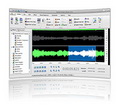
Sound Editor Deluxe это многофункциональный, визуальный аудио редактор для Windows. С данным инструментом вы всегда с легкостью сможете редактировать любые аудио файлы. Вы сможете увидеть музыку своими глазами и редактировать ее при помощи абсолютно нового визуального интерфейса.
Основные возможности:
- Проигрывайте, редактируйте, миксуйте и анализируйте аудио;
- Записывайте аудио с кассет, виниловых пластинок, радио и т.д.;
- Записывайте речь с помощью микрофона и прослушивайте речь в более медленном темпе, если вам нужно разобрать слова;
- Записывайте и прослушивайте аудио для подкастов или телефонных систем;
- Накладывайте спецэффекты, такие как затухание, эквалайзер, допплер, эхо, реверберация и другие;
- Перезаписывайте и восстанавливайте старые записи, удаляя шумы, щелчки и другие ненужные звуки плюс многое другое.
Системные требования:
Windows 2000/ XP/ Vista/ 7/ Server 2003/ 2008
Разработчик:
SED SystemsОфициальный сайт:
http://www.soundeditordeluxe.com/Размер файла:
17.4 MB
Цена:
$29.99
SED Systems также предлагает
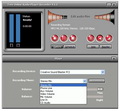
Free Online Radio Player Recorder это бесплатная программа, которая позволит вам слушать Интернет радио и смотреть Интернет-ТВ. Вы сможете смотреть более ста бесплатных Интернет-каналов и слушать самые разнообразные радиостанции. Вам не понадобится ТВ-карта, так как все каналы проходят через ваше Интернет-соединение.
GIVEAWAY download basket



iPhone предложения дня »




Android предложения дня »





Комментарии
Понравилась программа? Оставьте комментарий!
The program registered easily on my Windows 7 64x. (You have to click on the 'Help' menu to register.)
I did a quick test using a microphone and found it to be very easy to use. With all of the effects I am anxious to experiment with my guitar. There are many more features than are mentioned in the description.
Audacity is the closest freeware app I know of that is similar to this but this definitely has a lot of cool features that Audacity doesn't have. The asking price is reasonable too.
Thumbs up!
Save | Cancel
You can register the software using your own name.
Save | Cancel
drewi #3, I also get an error when trying text to speech. If you need text to speech, get Balabolka. It's new and free.
Hari, #4, Yes, it can split up audio files. Go to 'Edit' then 'Trim Start, 'Trim End' and 'Fade Out and Trim'.
Soundoctor #9, Use GSpot to identify the codecs: http://www.ehow.com/how_5082723_identify-audio-codecs.html
Save | Cancel
This is a very nice, quality application. I've had it installed for just about fifteen minutes and I already fixed a live track where the lead singer talks for about 2 minutes after the song ends...ick! Now it fades out after the song is over, but before the singer starts rambling on. Love it! I realize I can do that with Audacity, but I am finding this software has some pretty cool tricks on its own. You can download music directly from You Tube videos. Thanks so much, GAOTD! A nice way to start out the week.
Penny
Save | Cancel
Attractive, generally well organised GUI - lots of features. Looks a genuinely worthwhile program, including vinyl and cassette digitisation.
Noted 'Effcets' tab (spelling)& I wondered what 'Allien saying effect' was, under 'Favorites'.
Would be helpful to indicate 1-6 under 'Help' are on line. (The program includes 'help' under 'Contents').
A mouse-over tooltip would be useful for the top six icons (in the title bar).
I found having to click 'Exit Menu' a bit quirky - I'd expect clicking Home, File... Help would work with that open.. but they don't.
Save | Cancel